> ## Documentation Index
> Fetch the complete documentation index at: https://mainwp-docs-review-bulk-settings-manager-extension.mintlify.site/llms.txt
> Use this file to discover all available pages before exploring further.
# Code Snippets Overview
> WordPress Code Snippets for MainWP is a simple way to add code snippets to your Child Sites from one centralized location. No need to edit your theme's functions.php file or wp-config anymore!
## What You'll Learn
* Understanding the three code snippet types
* Executing and saving code snippets
* Removing snippets from child sites
* Recovering from bad snippets
* Useful wp-config.php snippets
***
**Extension Add-on** - This add-on provides standalone functionality within MainWP Dashboard. No third-party plugins required.
The [MainWP Code Snippets Extension](https://mainwp.com/extension/code-snippets/) is a simple way to add code snippets to your child sites from one centralized location. The code snippet is a small chunk of PHP code inserted directly into your child sites. Sometimes they contain full functions; other times, they modify an existing function.
**This tool is recommended for advanced users only.** We only recommend utilizing it if you are an experienced PHP coder.
## Code Snippet Types
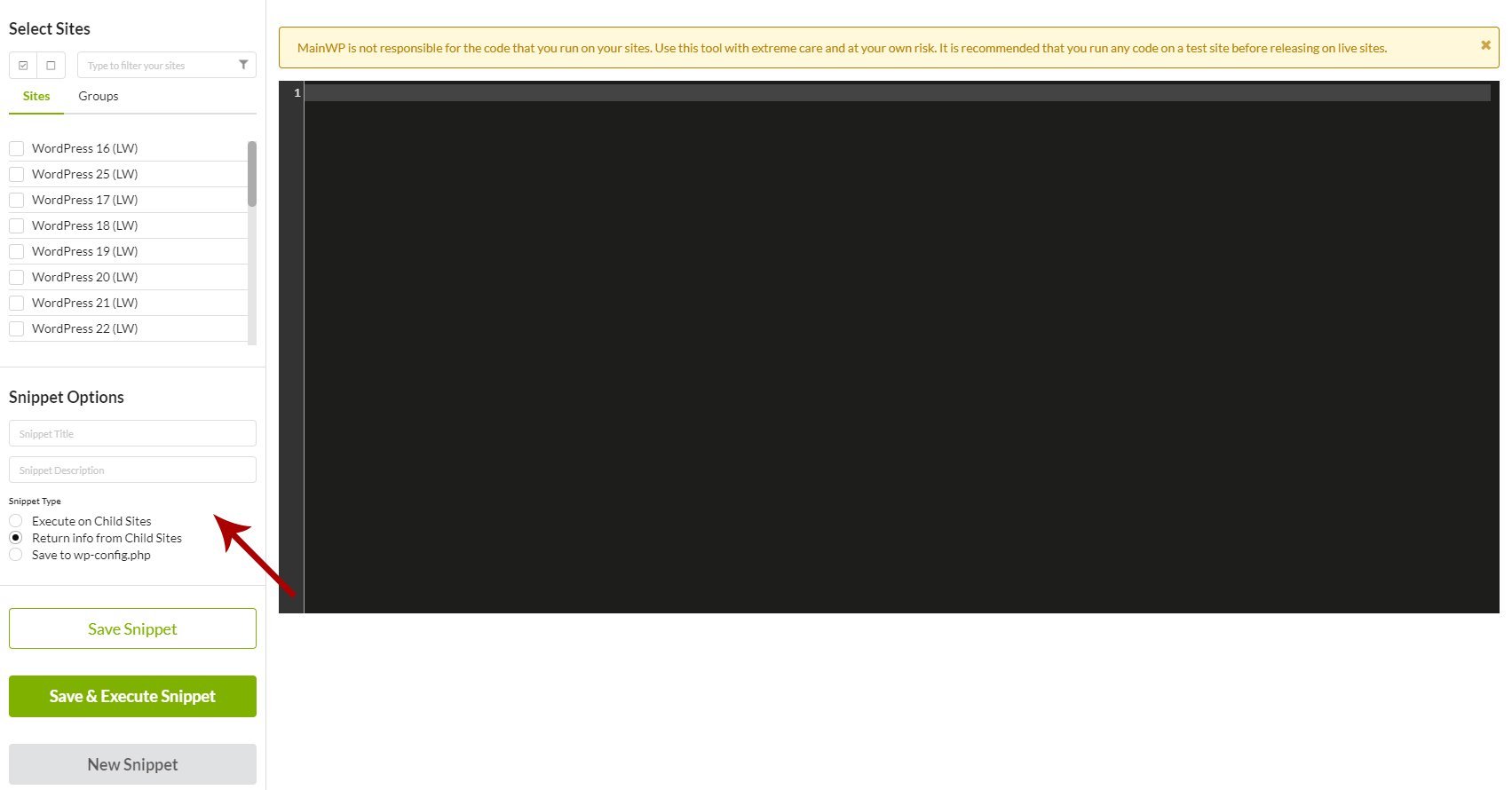
The MainWP Code Snippet Extension allows you to run code in three ways:
This type of snippet will add the snippet on your child site, and it will be executed on-site load. This type of snippets will be saved in your child site database and executed each time your child site is loaded. You would use this option to make actual changes to your child sites. For example, if you wanted to customize the admin footer across different sites in your network, you would use this option.
This type of snippet will get the info from child sites and display it in the Output Display. This type of snippet will not be saved on your child sites. This option queries the child and returns the information to you. An example would be if you wanted to know the published post count of all of your sites.
This type of snippets will be added to your child site wp-config.php file and saved only in that file. One of the most important files in your WordPress installation is the wp-config.php file. A Code Snippet in this section allows you to do things such as increase WordPress memory, block external requests, disable WP-Cron, and much more.
MainWP is not responsible for the code that you run on your sites. Use this tool with extreme care and at your own risk. Run any code on a test site before releasing it on live sites. If you execute a bad code snippet and crash your child sites, you need to remove the code snippet from your sites.
## Remove a Code Snippet From a Broken Site
Code snippets can be removed directly from the Database. To do this,
Locate and remove the **option\_name = mainwp\_ext\_snippets\_enabled** row, or **option\_name = mainwp\_ext\_code\_snippets.**
**This will remove all code snippets that were applied using our Code Snippets extension.** If you use bad snippets that are saved to the WP-Config.php, the file will need to be edited manually!
## Execute a Code Snippet
### Execute a New Code Snippet
Go to the **MainWP > Add-ons > Code Snippets > Execute Snippet** page
[Select Child Sites](/getting-started/mainwp-user-interface) where you want to execute the snippet **NOTE:** A snippet cannot be executed on both the selection of Sites and a selection of Tags. If it is already executed to either Sites or Tags, and you choose the other selection type, it will be removed from the existing selection.
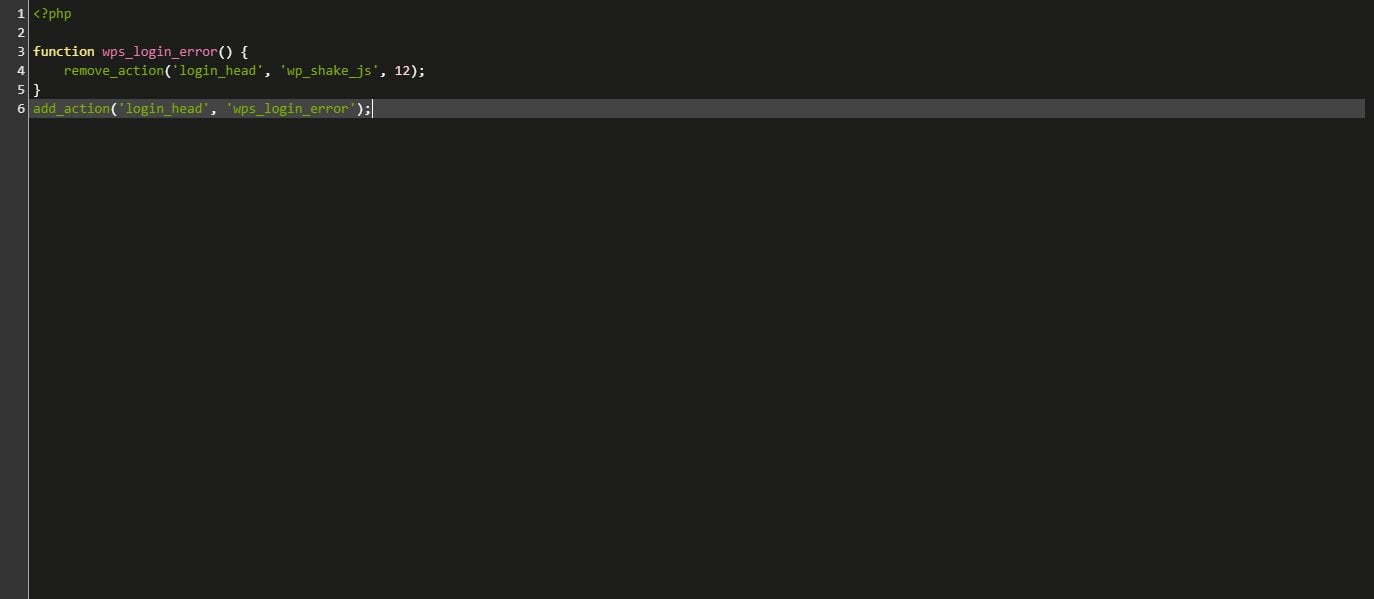
Add your Code Snippet in the code editor\[
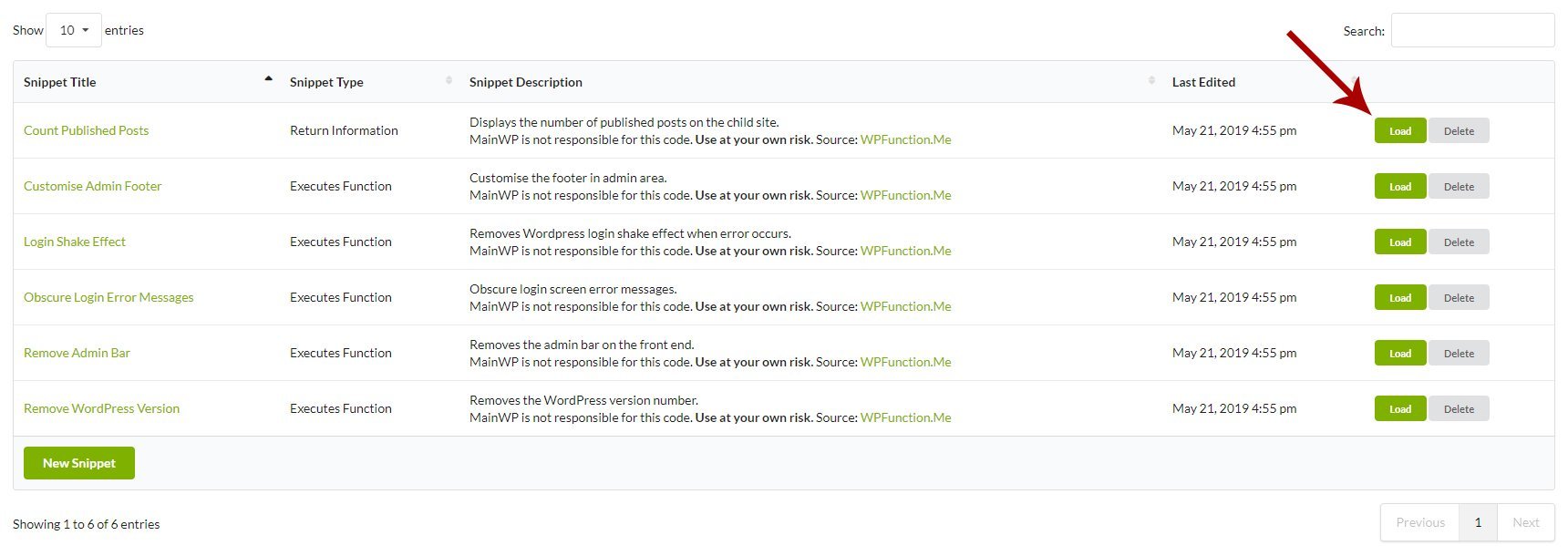
### Execute a Saved Code Snippet
Click the **Load** button\[
## Save a Code Snippet
### Save a New Code Snippet
Go to the **MainWP > Add-ons > Code Snippets > Execute Snippet** page
[Select Child Sites](/getting-started/mainwp-user-interface) where you plan to save the snippet **NOTE:** A snippet cannot be saved on both the selection of sites and a selection of tags. If it is already saved to either sites or tags, and you choose the other selection type, it will be removed from the existing selection.
Add your Code Snippet in the code editor\[
### Edit a Saved Code Snippet
Click the **Load** button \[
## Remove a Code Snippet From Child Sites
Once the Code Snippet loads, unselect child sites where you want to remove the snippet
This process will remove the snippet from all your site and re-add it only on sites that are still selected. This method is recommended in case you want to keep your snippet saved in the Save Snippets list so it can be used again in the future. If you want to remove the snippet from all child sites, you can un-check all sites and click the **Save & Execute** **Snippet** button.
## Useful Code Snippets
MainWP is not responsible for the code that you run on your sites. Use this tool with extreme care and at your own risk. It is recommended that you run any code on a test site before releasing it on live sites. In case you damage your site by using a bad code snippet, read [this](#remove-a-code-snippet-from-child-sites) to see how to fix it.
### Delete rows in the wp\_mainwp\_stream\_meta and wp\_mainwp\_stream tables
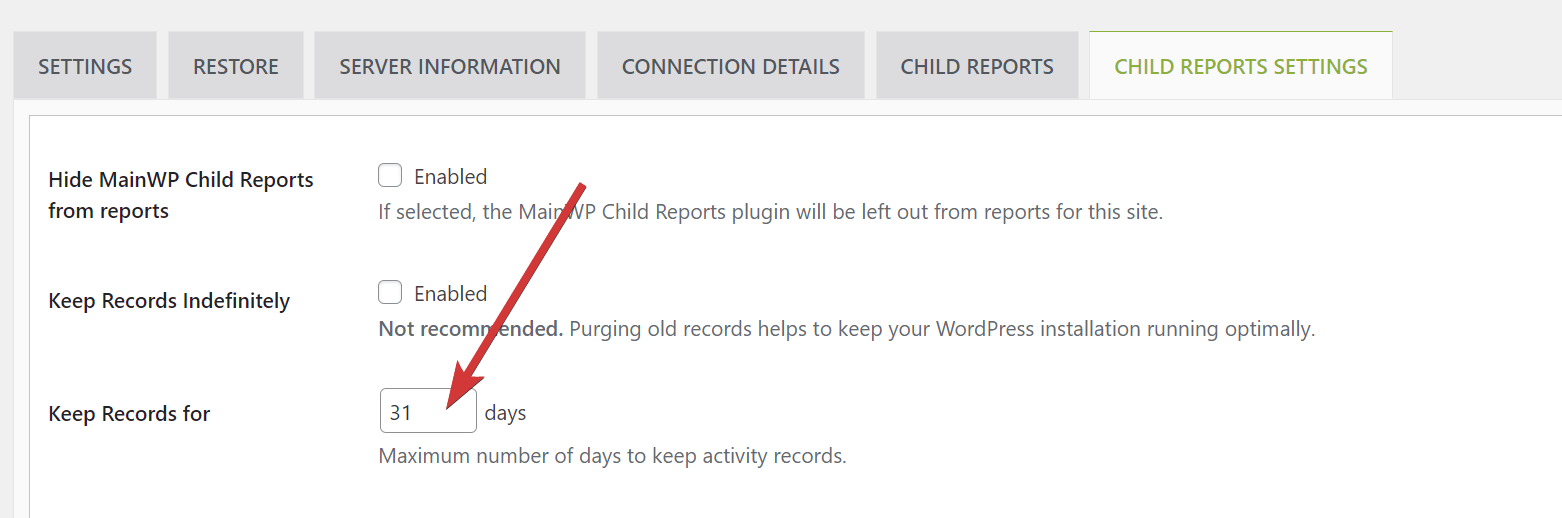
This can be useful if the wp\_mainwp\_stream\_meta and wp\_mainwp\_stream tables have grown large in size. To prevent them from growing this large in the future, consider lowering the number of days for which the records are kept. **NOTE:** This will delete all records in these two tables, which means that the Pro Reports reports will not have any information about events prior to this deletion.
*When running the script, make sure to select **Return info from Child Sites**.*
```php theme={null}
global $wpdb;
$wpdb->query( "TRUNCATE TABLE {$wpdb->mainwp_stream}" );
$wpdb->query( "TRUNCATE TABLE {$wpdb->mainwp_streammeta}" );
```
### Change the value of "Keep Records for" in MainWP Child Reports plugin
*When running the script, make sure to select **Return info from Child Sites**.*
```php theme={null}
global $wpdb;
$option = get_option( 'wp_mainwp_stream' );
if ( $option && isset( $option['general_records_ttl'] ) ) {
$option['general_records_ttl'] = 31; // New desired value (e.g., 30 days)
update_option( 'wp_mainwp_stream', $option );
}
```
### Disable theme, plugin editor and plugin, core updates
*This snippet goes to the **wp-config.php** file of your child sites. Be sure to select the correct (3rd) option when using the code snippet.*
```php theme={null}
define('DISALLOW_FILE_EDIT',true); // theme, plugin
define('DISALLOW_FILE_MODS',true); // core, plugin
```
### Disable CRON job feature
*This snippet goes to the **wp-config.php** file of your site. Be sure to select the correct (3rd) option when using the code snippet.*
```php theme={null}
define('DISABLE_WP_CRON', true);
```
### Set auto-save interval
*This snippet goes to the **wp-config.php** file of your site. Be sure to select the correct (3rd) option when using the code snippet.*
```php theme={null}
define('AUTOSAVE_INTERVAL', 200);
```
### Block external requests
*This snippet goes to the **wp-config.php** file of your site. Be sure to select the correct (3rd) option when using the code snippet.*
```php theme={null}
define('WP_HTTP_BLOCK_EXTERNAL', true);
```
This Snippet will hide plugin and theme updates. Because of that, you won't be able to see it in your Dashboard too.
### Increase WordPress memory limit
*This snippet goes to the **wp-config.php** file of your site. Be sure to select the correct (3rd) option when using the code snippet.*
```php theme={null}
define('WP_MEMORY_LIMIT', '95M');
```
### Enable Debug Mode
*This snippet goes to the **wp-config.php** file of your site.* *Be sure to select the correct (3rd) option when using the code snippet.*
```php theme={null}
define( 'WP_DEBUG', true );
```
### Disable All Core Updates
*This snippet goes to the **wp-config.php** file of your site. Be sure to select the correct 3rd) option when using the code snippet.*
```php theme={null}
define( 'WP_AUTO_UPDATE_CORE', false );
```
### Protect WordPress against malicious URL requests
*This snippet has to be saved to the **functions.php** file so be sure to select the "Execute on Child Sites" options when executing the snippet.*
```php theme={null}
global $user_ID; if($user_ID) {
if(!current_user_can('administrator')) {
if (strlen($_SERVER['REQUEST_URI']) > 255 ||
stripos($_SERVER['REQUEST_URI'], "eval(") ||
stripos($_SERVER['REQUEST_URI'], "CONCAT") ||
stripos($_SERVER['REQUEST_URI'], "UNION+SELECT") ||
stripos($_SERVER['REQUEST_URI'], "base64")) {
@header("HTTP/1.1 414 Request-URI Too Long");
@header("Status: 414 Request-URI Too Long");
@header("Connection: Close");
@exit;
}
}
}
```
Source: [WPSnip.com](http://wpsnip.com/)
***
## Related Resources
* [Development Add-ons](/add-ons/development) - Browse all development tools
* [Detect the Essential Plugin wp-config.php compromise](/add-ons/development/detect-wpos-analytics-wp-config-compromise) - Use a read-only snippet to check child sites for known compromise indicators
* [White Label Extension](/add-ons/agency/white-label-extension) - Deploy filters to child sites
* [Bulk Settings Manager](/add-ons/administrative/bulk-settings-manager-extension) - Manage plugin settings
 *When running the script, make sure to select **Return info from Child Sites**.*
```php theme={null}
global $wpdb;
$option = get_option( 'wp_mainwp_stream' );
if ( $option && isset( $option['general_records_ttl'] ) ) {
$option['general_records_ttl'] = 31; // New desired value (e.g., 30 days)
update_option( 'wp_mainwp_stream', $option );
}
```
### Disable theme, plugin editor and plugin, core updates
*This snippet goes to the **wp-config.php** file of your child sites. Be sure to select the correct (3rd) option when using the code snippet.*
```php theme={null}
define('DISALLOW_FILE_EDIT',true); // theme, plugin
define('DISALLOW_FILE_MODS',true); // core, plugin
```
### Disable CRON job feature
*This snippet goes to the **wp-config.php** file of your site. Be sure to select the correct (3rd) option when using the code snippet.*
```php theme={null}
define('DISABLE_WP_CRON', true);
```
### Set auto-save interval
*This snippet goes to the **wp-config.php** file of your site. Be sure to select the correct (3rd) option when using the code snippet.*
```php theme={null}
define('AUTOSAVE_INTERVAL', 200);
```
### Block external requests
*This snippet goes to the **wp-config.php** file of your site. Be sure to select the correct (3rd) option when using the code snippet.*
```php theme={null}
define('WP_HTTP_BLOCK_EXTERNAL', true);
```
This Snippet will hide plugin and theme updates. Because of that, you won't be able to see it in your Dashboard too.
### Increase WordPress memory limit
*This snippet goes to the **wp-config.php** file of your site. Be sure to select the correct (3rd) option when using the code snippet.*
```php theme={null}
define('WP_MEMORY_LIMIT', '95M');
```
### Enable Debug Mode
*This snippet goes to the **wp-config.php** file of your site.* *Be sure to select the correct (3rd) option when using the code snippet.*
```php theme={null}
define( 'WP_DEBUG', true );
```
### Disable All Core Updates
*This snippet goes to the **wp-config.php** file of your site. Be sure to select the correct 3rd) option when using the code snippet.*
```php theme={null}
define( 'WP_AUTO_UPDATE_CORE', false );
```
### Protect WordPress against malicious URL requests
*This snippet has to be saved to the **functions.php** file so be sure to select the "Execute on Child Sites" options when executing the snippet.*
```php theme={null}
global $user_ID; if($user_ID) {
if(!current_user_can('administrator')) {
if (strlen($_SERVER['REQUEST_URI']) > 255 ||
stripos($_SERVER['REQUEST_URI'], "eval(") ||
stripos($_SERVER['REQUEST_URI'], "CONCAT") ||
stripos($_SERVER['REQUEST_URI'], "UNION+SELECT") ||
stripos($_SERVER['REQUEST_URI'], "base64")) {
@header("HTTP/1.1 414 Request-URI Too Long");
@header("Status: 414 Request-URI Too Long");
@header("Connection: Close");
@exit;
}
}
}
```
Source: [WPSnip.com](http://wpsnip.com/)
***
## Related Resources
* [Development Add-ons](/add-ons/development) - Browse all development tools
* [Detect the Essential Plugin wp-config.php compromise](/add-ons/development/detect-wpos-analytics-wp-config-compromise) - Use a read-only snippet to check child sites for known compromise indicators
* [White Label Extension](/add-ons/agency/white-label-extension) - Deploy filters to child sites
* [Bulk Settings Manager](/add-ons/administrative/bulk-settings-manager-extension) - Manage plugin settings
*When running the script, make sure to select **Return info from Child Sites**.*
```php theme={null}
global $wpdb;
$option = get_option( 'wp_mainwp_stream' );
if ( $option && isset( $option['general_records_ttl'] ) ) {
$option['general_records_ttl'] = 31; // New desired value (e.g., 30 days)
update_option( 'wp_mainwp_stream', $option );
}
```
### Disable theme, plugin editor and plugin, core updates
*This snippet goes to the **wp-config.php** file of your child sites. Be sure to select the correct (3rd) option when using the code snippet.*
```php theme={null}
define('DISALLOW_FILE_EDIT',true); // theme, plugin
define('DISALLOW_FILE_MODS',true); // core, plugin
```
### Disable CRON job feature
*This snippet goes to the **wp-config.php** file of your site. Be sure to select the correct (3rd) option when using the code snippet.*
```php theme={null}
define('DISABLE_WP_CRON', true);
```
### Set auto-save interval
*This snippet goes to the **wp-config.php** file of your site. Be sure to select the correct (3rd) option when using the code snippet.*
```php theme={null}
define('AUTOSAVE_INTERVAL', 200);
```
### Block external requests
*This snippet goes to the **wp-config.php** file of your site. Be sure to select the correct (3rd) option when using the code snippet.*
```php theme={null}
define('WP_HTTP_BLOCK_EXTERNAL', true);
```
This Snippet will hide plugin and theme updates. Because of that, you won't be able to see it in your Dashboard too.
### Increase WordPress memory limit
*This snippet goes to the **wp-config.php** file of your site. Be sure to select the correct (3rd) option when using the code snippet.*
```php theme={null}
define('WP_MEMORY_LIMIT', '95M');
```
### Enable Debug Mode
*This snippet goes to the **wp-config.php** file of your site.* *Be sure to select the correct (3rd) option when using the code snippet.*
```php theme={null}
define( 'WP_DEBUG', true );
```
### Disable All Core Updates
*This snippet goes to the **wp-config.php** file of your site. Be sure to select the correct 3rd) option when using the code snippet.*
```php theme={null}
define( 'WP_AUTO_UPDATE_CORE', false );
```
### Protect WordPress against malicious URL requests
*This snippet has to be saved to the **functions.php** file so be sure to select the "Execute on Child Sites" options when executing the snippet.*
```php theme={null}
global $user_ID; if($user_ID) {
if(!current_user_can('administrator')) {
if (strlen($_SERVER['REQUEST_URI']) > 255 ||
stripos($_SERVER['REQUEST_URI'], "eval(") ||
stripos($_SERVER['REQUEST_URI'], "CONCAT") ||
stripos($_SERVER['REQUEST_URI'], "UNION+SELECT") ||
stripos($_SERVER['REQUEST_URI'], "base64")) {
@header("HTTP/1.1 414 Request-URI Too Long");
@header("Status: 414 Request-URI Too Long");
@header("Connection: Close");
@exit;
}
}
}
```
Source: [WPSnip.com](http://wpsnip.com/)
***
## Related Resources
* [Development Add-ons](/add-ons/development) - Browse all development tools
* [Detect the Essential Plugin wp-config.php compromise](/add-ons/development/detect-wpos-analytics-wp-config-compromise) - Use a read-only snippet to check child sites for known compromise indicators
* [White Label Extension](/add-ons/agency/white-label-extension) - Deploy filters to child sites
* [Bulk Settings Manager](/add-ons/administrative/bulk-settings-manager-extension) - Manage plugin settings